Affordability calculator
A finance tool created for brokers to calculate affordability instantly
The affordability calculator is designed specifically for Landbay’s Buy-to-Let platform, helping brokers and landlords assess mortgage eligibility without needing to select a specific product upfront.
In this project, I improved Landbay’s existing products page and designed a new product-free affordability calculator, enabling users to calculate their maximum loan amount and minimum monthly rental income.
Product-free affordability calculator allows brokers to calculate affordability without selecting a product upfront.
Overview
This project is now live on Landbay’s website.
Problem statements
-
Brokers can only calculate affordability for a limited number of products.
-
Brokers need to have a product in mind before calculating affordability.
-
Brokers get confused by “Maximum net loan” despite the tooltip.
-
The comparison feature on the product cards does not stand out.
-
Product result cards are missing key information (e.g., total cost, maximum net loan).
-
Brokers cannot easily understand how much they can get without fees included.
-
Brokers cannot calculate the minimum monthly rental income.
Goals
-
Create a new calculator so that users can calculate their affordability without selecting a product and show eligible products.
-
Allow users to sort and filter results to find the products they need.
-
Update advanced filters to ensure they are future-proof.
-
Show both maximum net and gross loan amounts.
-
Display the “total cost” over the initial period for each product.
-
Make the comparison feature clear so users can easily select products and compare affordability side by side on the products page.
Research
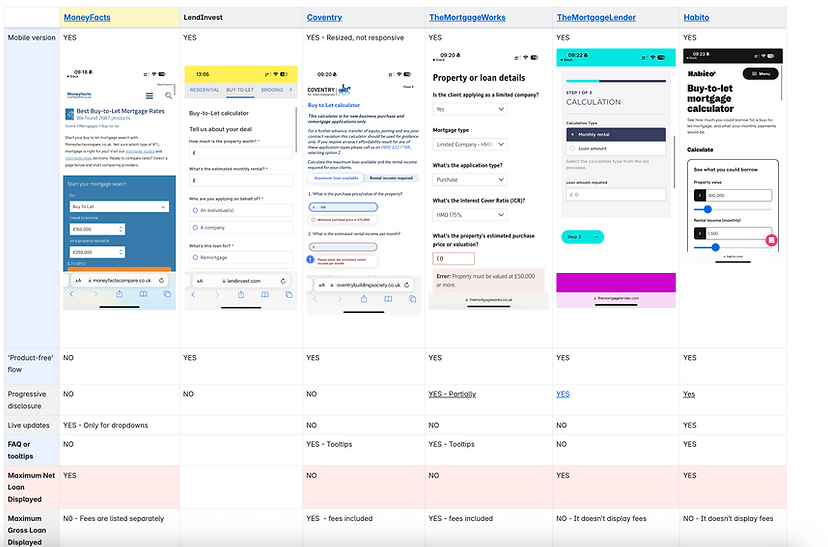
To kick off this use case, I researched competitors to see how other lenders design and present their affordability calculators on their websites. I also spoke with brokers to better understand their pain points with our current product calculator and to identify opportunities to improve it for them.
Market research
User interview summary
Users are generally satisfied with the current product calculator, finding it accurate, user-friendly, an better than most of the competitors.
Key features appreciated:
-
Users value the ability to compare products directly, automatic stress rate calculations, and comprehensive product range options.
-
The desktop experience is prioritised, with no immediate need for mobile optimisation.
-
Users appreciate the simplicity, speed, and clear interface of the calculator and portal.
Suggested improvements:
-
Users recommend enhancements such as:
-
Adding features to compare total costs over fixed periods, including arrangement fees.
-
Displaying products ordered by the lowest rate or total cost.
-
Simplifying the process further by showing all available products after entering basic information.
-
Overall findings
-
Market: Four in five calculators in the market don’t require a product selection upfront.
-
Satisfaction: Most users are satisfied with our calculator, considered among the best available in the BLT market.
-
Usage: The calculator is primarily used on a desktop.
-
Improvements: Despite some personal preferences, users agree that the current calculator needs improvement for example, the comparison feature should stand out more, and the product cards need to be clearer to avoid confusion.
-
Product-free calculator: Users recognise the benefits of a product-free calculator in a separate section of the Landbay's marketing portal.
Wireframes of a product free calculator
Before starting the high-fidelity designs, I developed the user flow for calculating the maximum borrowable amount and the minimum required rental income for the product fee calculator.

High-fidelity design

Before moving to high-fidelity designs, I mapped the user flow for calculating the maximum borrowable amount and minimum required rental income in the product fee calculator.

Max loan amount
All fields need to be completed before calculating the
maximum loan amount.
This view appears when all the required fields are
completed.
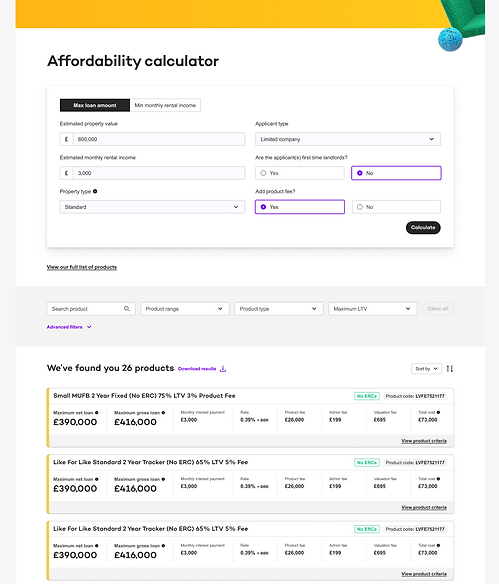
Once the user clicks on Calculate, all the products that match to users affordability are presented on the screen.
-
The user can filter the products by product range, product type, and maximum LTV (Loan to Value).
-
They can download the results and share them with their clients.
-
They can clearly see how much they can borrow without fees included.
-
They can also see the total cost of borrowing, including fees, over the initial term.
-
They can view the product criteria if they want to.
Time savings for sales team
The improved product results cards saved the sales team around 5% of their time weekly by making information clearer for brokers, reducing the need for calls to sales for clarification.
Min loan amount


All fields need to be completed before calculating the
maximum loan amount.
This view appears when all the required fields are
completed.
Project continuation in progress.